Now on the App Store and Google Play
Clear your review queue from your phone.
MergeBell is a native GitLab™ app for iPhone and Android. Your To-Do inbox, merge request review with diffs and line comments, approve and merge, and the pipeline that failed — for gitlab.com and the GitLab your company runs. Free for the whole review loop.
On the App Store for iOS 26 or later and on Google Play for Android 12 or later. How your code stays safe.
An independent app. Not affiliated, endorsed, sponsored, or approved with or by GitLab Inc.
GitLab has no app. Your reviews still wait for you.
GitLab Inc. has never shipped a native mobile app. On a phone you get the web interface: no notifications you can act on, no inbox, and diffs built for a 27-inch screen.
So a one-line fix waits until you are back at a laptop, and the pipeline that broke on main waits for whoever notices first.
MergeBell is the part that was missing: it tells you when it is your turn, and lets you finish the job right there.
MergeBell now
Review requested · !42 Rotate GitLab refresh tokens in a single flight
empath/relay · Priya Nair asked you to review
OpenMark done
MergeBell now
Pipeline failed · !41 Retry APNs sends on 503 with backoff
empath/relay · verify:migrations failed on alexr/apns-backoff
RetryOpen
The whole review loop, not just a feed.
Read, comment, approve, merge, retry — each one finished on the phone, not bookmarked for later.
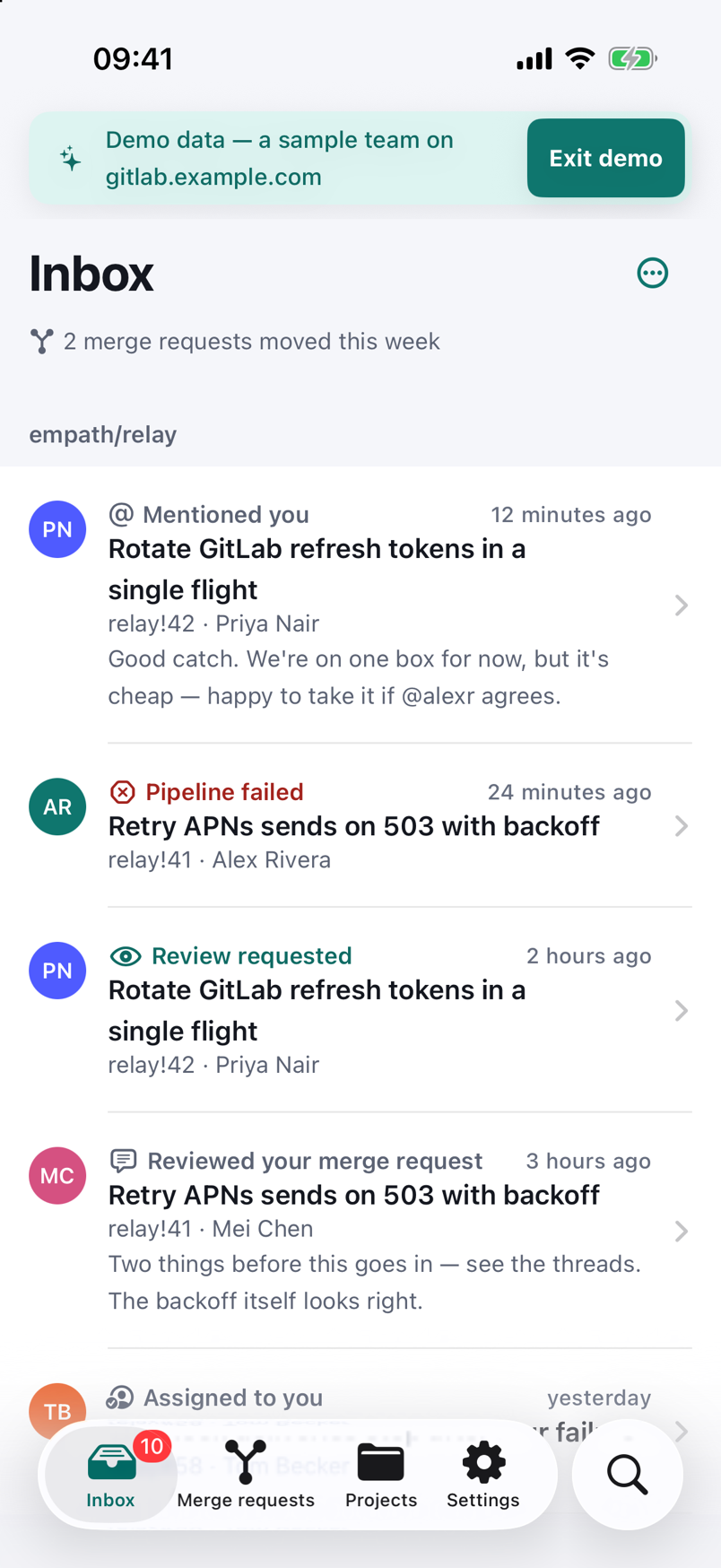
An inbox for your GitLab To-Dos
Review requests, mentions, assignments and failed pipelines in one list, grouped by project. Swipe to mark done, with an undo if you swipe the wrong one.
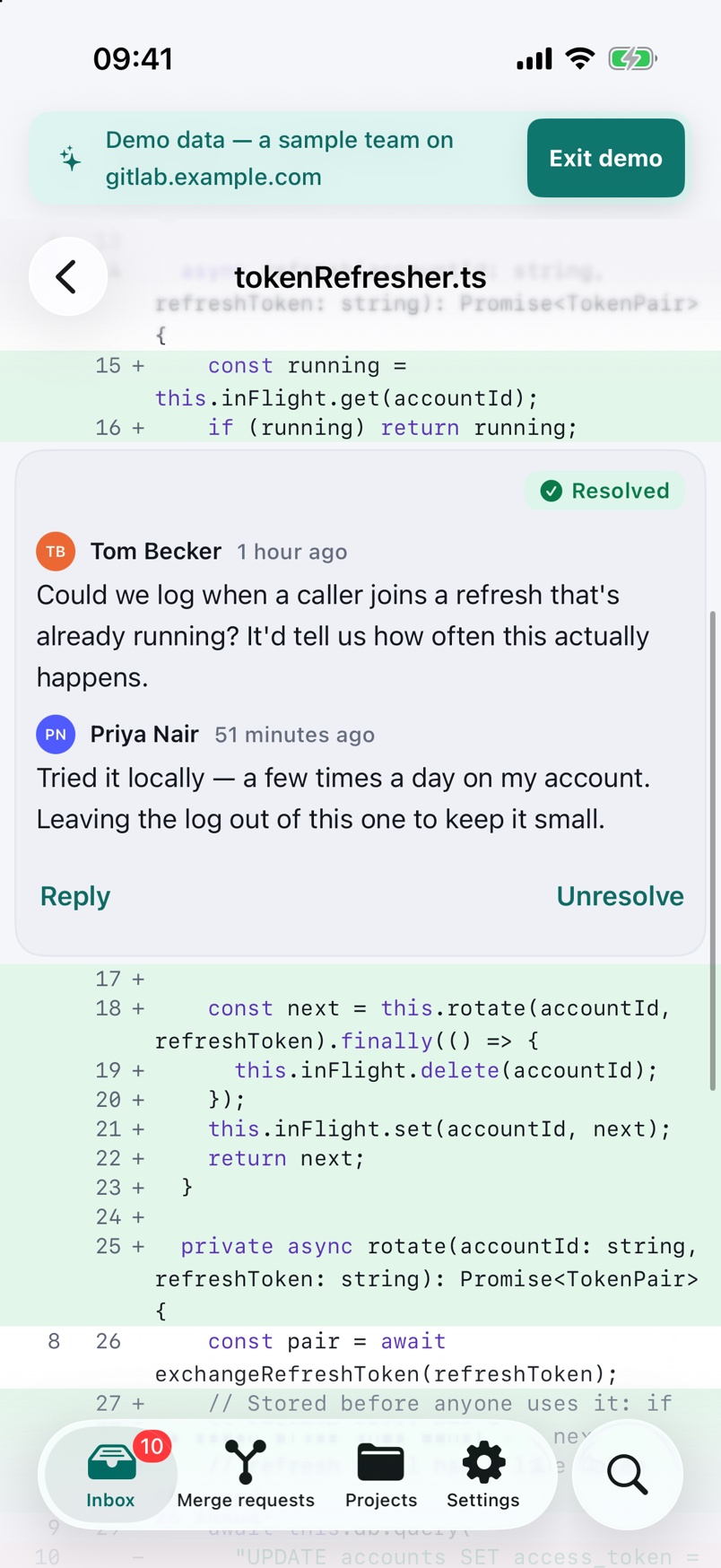
Diffs made for a phone
A file list with the size of every change, a unified diff that never scrolls the page sideways, and a comment on any line in two taps. Renamed, binary and huge files say so instead of drawing blank.
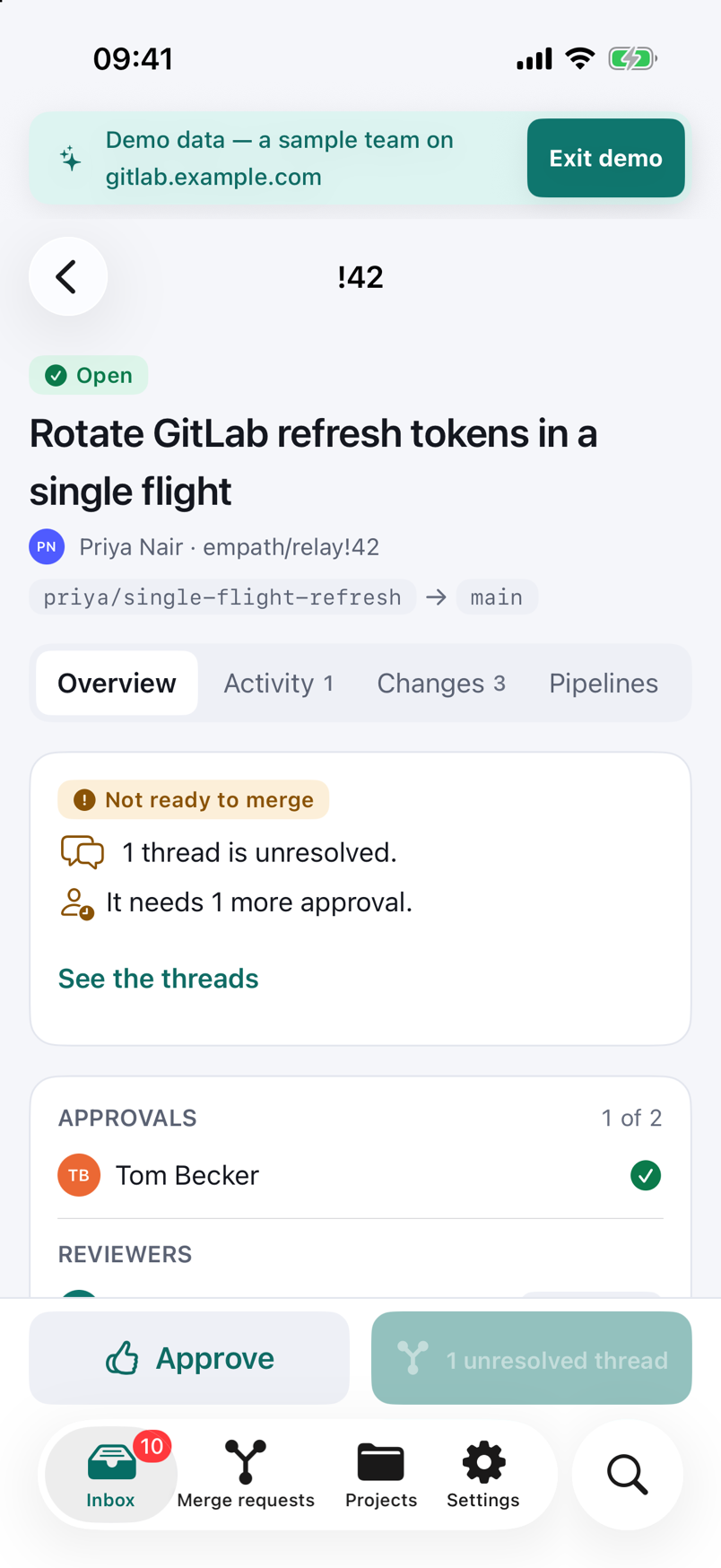
Approve and merge, with every reason it can’t
Each merge request lists what is blocking — approvals, unresolved threads, a failed pipeline, conflicts — before you tap Merge. Squash, delete the branch, or set it to merge when the pipeline passes.
Fix the pipeline from where you are
Live job logs, retry a flaky job, cancel a stuck one, or play a manual deploy. On Pro, follow a running pipeline on the Lock Screen — a live notification on Android, a Live Activity on iPhone — and retry it from there if it fails.
Pinged when it is your turn
Push alerts for new To-Dos, free, checked every five minutes. Pro checks every minute, or within seconds with Instant mode, and can watch a branch for failures.
Works on the train
The last 20 merge requests you opened stay readable offline. Comments, approvals and To-Dos you act on offline are queued and posted in order when you are back.
Your company’s GitLab, not only gitlab.com.
Add your own instance by its address and a personal access token — the sign-in screen opens the token page with the name and scope already filled in. GitLab 16.0 and later is supported, and a private certificate or a VPN gets a clear explanation instead of a cryptic error.
The free tier covers one gitlab.com account and one self-managed instance. Pro removes the limit and merges every To-Do into one inbox.
Real screens.
Every screenshot on this site is captured from the app's own Demo Mode — nothing mocked up, nothing invented.
Free for the review loop. $4.99 a month for speed.
Pro is $4.99 per month or $14.99 per year. New subscribers can start the yearly plan with a first month for $0.99, and it renews at $14.99 a year after that. No weekly plan, no free trial, no lifetime. Payment is handled by Google Play on Android and by Apple on iPhone; cancel from your phone in two taps.
| Feature | Free | Pro · $4.99/mo or $14.99/yr |
|---|---|---|
| GitLab accounts | One gitlab.com account and one self-managed instance | Unlimited, with a unified inbox across all of them |
| To-Do inbox | Swipe to done, grouped by project | Swipe to done, grouped by project |
| Merge request review | Diffs, line comments, replies, resolve threads | Plus review drafts published as one review, with Request changes |
| Approve and merge | Approve, unapprove, merge, squash, auto-merge | Approve, unapprove, merge, squash, auto-merge |
| Suggestions | Not included | Write suggestion blocks, apply one or a batch in one tap |
| Pipelines and jobs | Live logs, retry, cancel, play manual jobs | Plus a Live Activity and Retry from the Lock Screen |
| Push alerts for your To-Dos | Checked every 5 minutes | Checked every minute, or in seconds with Instant mode |
| Alert rules and quiet hours | Not included | Per-event toggles, muted projects, quiet hours |
| Pipeline watches | Not included | Up to 10 branches: failed, recovered, waiting on a manual job |
| Issues, search and files | Included | Plus code search where your instance allows it |
| Offline cache and queued actions | Included | Included |
| Demo Mode and dark mode | Included | Included |
Prices are in US dollars and may differ in your local store.
Your token stays on your phone. Our server can only read.
MergeBell signs in to gitlab.com through GitLab’s own page in the system browser, and keeps your token on the phone — encrypted with the Android Keystore, or in the iPhone Keychain. The app talks to GitLab directly — there is no server in the middle and no account to create with us.
Alerts are the one exception, because something has to check GitLab while your phone is asleep. Turning them on gives our server a second, separate key that can only read — and the server refuses any key that could approve, merge or push. It runs on our own machine in Germany.
The things people ask first.
Is there an official GitLab mobile app?
No. GitLab Inc. has not released a native app for Android or iPhone, and the request for one (issue 369066) has been open on GitLab’s own issue tracker since 2022. On a phone you get the mobile web interface: no push notifications, no inbox, and diffs that were never meant for a small screen.
MergeBell is an independent app built on GitLab’s public API. It is not made by, affiliated with or endorsed by GitLab Inc.
Does it work with self-managed GitLab?
Yes. Sign in to gitlab.com with GitLab’s own sign-in page, or add your company’s GitLab by its address and a personal access token. Instances running GitLab 16.0 or later are supported.
If your instance sits behind a VPN, the app works whenever your phone is on the VPN, and alerts switch to on-device checks — the app tells you when that is the case.
What can I do for free?
The whole review loop: the To-Do inbox, merge request diffs and line comments, replies and resolving threads, approve and merge (including squash and auto-merge), pipelines with live logs, retry, cancel and manual jobs, issues, search and the file browser — plus push alerts for your To-Dos, checked every five minutes.
Pro adds speed and power tools: one-minute and Instant alerts, pipeline watches, Live Activities, review drafts with Request changes, suggestions, and more than one account per kind.
What does Pro cost?
Pro is $4.99 per month or $14.99 per year. New subscribers can start the yearly plan with a first month for $0.99, and it renews at $14.99 a year after that. There is no weekly plan and no free trial.
Payment is handled by Google Play on Android and by Apple on iPhone, and you can cancel any time from your phone’s subscription settings.
Can your server merge code or push to my repositories?
No. The token you sign in with stays on your phone — in the Android Keystore or the iPhone Keychain — and is only used by the app. If you turn on alerts, you give our server a second, separate key that can only read — and the server refuses any key that could write.
The server calls a short, fixed list of read-only GitLab endpoints. The full list is on the security page.
Is there an iPhone app?
Yes. MergeBell for iPhone has been on the App Store since 26 October 2026, for iOS 26 and later, with the same free tier and the same Pro plans as on Android.
Is it on Android?
Yes. MergeBell is on Google Play for Android 12 and later, with the same free tier and the same Pro plans as on iPhone.
More on the support page.
Guides for doing GitLab work away from the desk.
Straight answers to the questions GitLab users ask most, with links to GitLab’s own docs.
GitLab app for iPhone: MergeBell is now on the App Store
MergeBell, a native GitLab app for iPhone, is on the App Store: To-Do inbox, diffs, approve and merge, pipelines, push alerts, widgets and a Live Activity.
GitLab app for Android: MergeBell on Google Play
MergeBell is a native GitLab app for Android 12 and later on Google Play: To-Do inbox, diffs, approve and merge, pipelines, push alerts and widgets.
GitLab app for iPhone and Android: MergeBell on both stores
MergeBell is on the App Store and Google Play. What's the same on iPhone and Android, what differs, what Pro costs in each store, and how to switch phones.
Does GitLab have a mobile app? The 2026 answer
No — GitLab Inc. has no official Android or iPhone app. What works on a phone instead: the mobile site, email, Slack, AI assistants and third-party apps.
Get MergeBell
Free for the whole review loop: the To-Do inbox, diffs and line comments, approve and merge, pipelines with retry, and push alerts for your To-Dos. Works with gitlab.com and self-managed GitLab 16.0+.
Get MergeBell for iPhoneGet MergeBell for Android
On the App Store for iOS 26 or later and on Google Play for Android 12 or later. An independent app, not affiliated with GitLab Inc.